
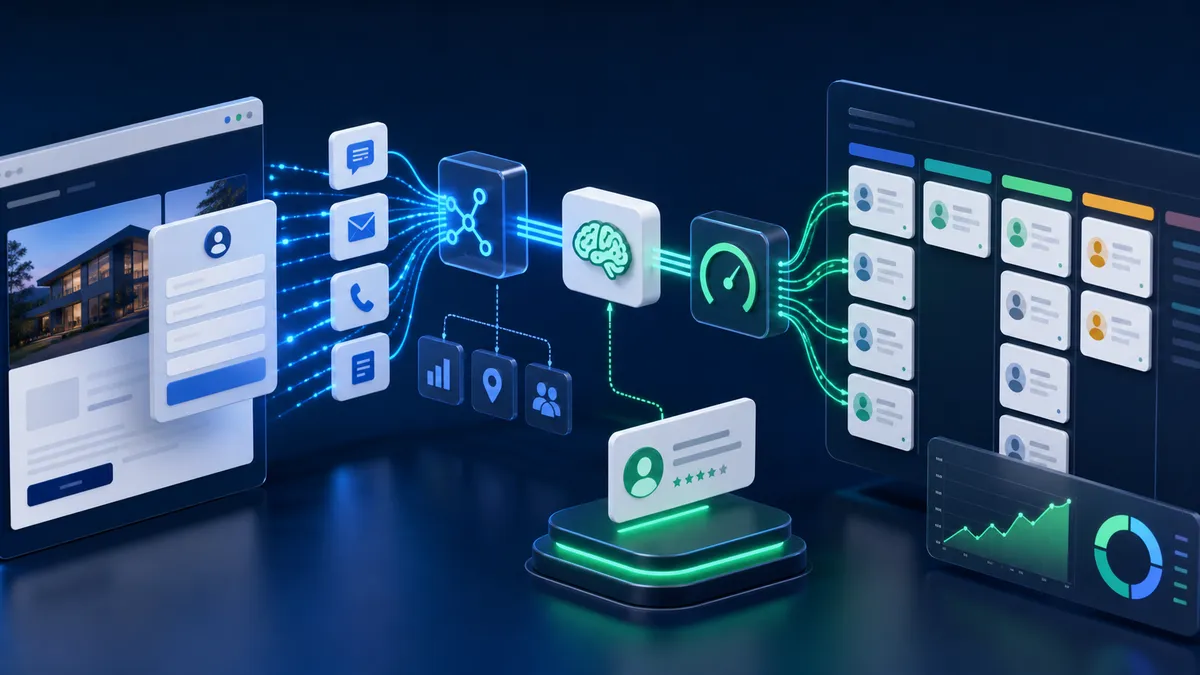
AI lead generation is no longer just a chatbot that answers common questions. For a service business, the real opportunity is building a connected system that captures intent, understands context, scores the opportunity, updates the CRM, and starts the right follow-up before the lead goes cold.
Quick answer: Businesses generate leads automatically with AI by connecting website forms, chat, analytics, CRM records, and workflow automation. The system captures the inquiry, enriches it with behavior and source data, scores fit and urgency, routes the lead to the right owner, and triggers a personalized next step.
The important shift is architectural. A static form collects contact details. An AI lead generation system collects a buying signal and turns it into a business action.
That action might be a Slack alert for a hot lead, a HubSpot deal with a summary, a booking link sent by email, a WhatsApp follow-up, a nurture sequence for a lower-fit prospect, or a human review task for a complex request.
What This Problem Really Means for a Business
Most lead generation problems are not traffic problems first. They are context problems.
A person visits a service page, compares a few offers, reads a case study, opens the contact form, and submits a short message. The analytics platform knows the pages they visited. The CRM knows the contact once the form is submitted. The inbox has the message. The sales person has to connect all of it manually.
That delay creates three leaks:
- Response leak: the lead waits too long for a meaningful reply.
- Context leak: the business forgets which page, service, location, or campaign created the inquiry.
- Qualification leak: every lead gets treated the same, even when one person is ready to buy and another is only researching.
AI automation fixes this by joining the signals that already exist. The website becomes more than a brochure. It becomes an intake engine for sales and operations.
For a local or professional service business, this matters because the first few minutes often shape the buyer’s perception. A fast, specific response feels organized. A slow, generic response makes the prospect keep searching.
Why Most Businesses Get This Wrong
The common mistake is installing a chatbot before designing the workflow.
A chatbot alone does not solve lead generation if the transcript stays trapped in the chat platform, the CRM is not updated, and the sales team still has to read everything manually. It can even create more work by producing messy conversations with no structured fields.
The second mistake is keeping the website, analytics, CRM, and email platform disconnected. When tools do not share data, the business creates a fragmented stack: one system knows the traffic source, one knows the identity, one sends the email, and one stores the sales stage.
The third mistake is forgetting performance. AI widgets, heatmaps, tracking pixels, and dynamic forms can add heavy JavaScript. If the page becomes slow or unresponsive, the lead never reaches the automation layer.
The fourth mistake is over-automating trust. AI should handle capture, enrichment, scoring, routing, and first response. It should not blindly close high-ticket service deals without human judgment. The best systems use AI to remove delay while keeping humans involved where relationship, strategy, and nuance matter.
How to Diagnose the Current Lead Flow
Before adding AI, audit the current path from first visit to sales action.
Start with speed:
- How long does it take for a form submission to reach the CRM?
- How long does it take for the first meaningful response to go out?
- Are after-hours and weekend leads handled differently?
- Does a high-intent service page trigger any special routing?
Then check context:
- Does the CRM record include the page where the lead converted?
- Are UTM parameters saved?
- Is the lead tied to a previous session or returning visitor ID?
- Can the sales person see the service, location, urgency, and source without opening multiple tools?
Finally, check conversion quality:
- Which pages produce booked calls?
- Which forms create incomplete records?
- Which leads are rejected as poor fit?
- Which follow-ups get replies?
- Where do users abandon the form or chat flow?
If these questions cannot be answered, the business does not need a smarter chatbot yet. It needs cleaner measurement and routing.
What to Fix First
Fix the intake system before selecting the AI model.
A strong first version usually has four parts:
- Webhook capture: every form, chat, booking request, or ad lead sends a structured payload into an automation layer.
- Context enrichment: the workflow adds source, campaign, page, location, session, and CRM history when available.
- AI classification: the model turns messy text into structured fields such as service need, urgency, fit, budget signal, and missing information.
- CRM routing: the workflow creates or updates the lead, assigns an owner, and starts the correct follow-up.
This can be built with platforms such as n8n, Make, Zapier, HubSpot workflows, or custom API routes. The tool matters less than the architecture. The system should move data reliably, preserve context, and make the next action obvious.
Technical SEO Considerations: INP and AI Widgets
AI lead generation depends on a fast website. If a visitor taps a form, opens a chat, or clicks a booking button and the interface freezes, the automation loses the lead before it starts.
Interaction to Next Paint, or INP, is especially important because it measures how quickly the page visually responds after an interaction. Heavy JavaScript can delay that response. Chat widgets, personalization scripts, analytics tools, and form validation code can all compete for the browser’s main thread.
A service business should treat lead capture components as performance-sensitive UI:
| Risk | Practical fix |
|---|---|
| Chat script blocks the first load | Use a lightweight facade and load the full assistant after interaction. |
| Form validation runs on every keystroke | Debounce validation and keep the DOM simple. |
| Too many tracking tags load together | Defer non-critical scripts and remove duplicate tools. |
| Dynamic widgets shift the layout | Reserve space or use overlays that do not move content. |
| Large hero media slows the page | Use optimized image formats, correct dimensions, and preload only critical assets. |
This is why web development and SEO growth matter for AI automation. The workflow can be smart, but the website still has to be fast, crawlable, and easy to use.
GEO Considerations: Getting Discovered by AI Search
Generative Engine Optimization, or GEO, changes how prospects discover providers. Instead of searching only through blue links, users ask AI systems for recommendations, comparisons, workflows, and vendor shortlists.
A business that wants AI-generated visibility needs pages that are easy for answer engines to understand:
- Clear service definitions.
- Direct answers to buyer questions.
- Structured data for the business, services, author, article, and FAQ content.
- Current examples, proof, and dates.
- Crawlable HTML instead of important content hidden behind client-side rendering.
- Internal links that connect articles to service pages and contact paths.
AI search can compress research. A user may arrive at the site already aware of the problem, possible solutions, and provider criteria. That makes the post-click workflow more important. The page should not only attract the visit; it should qualify and route the visitor quickly.
For more context, see the guide on optimizing a website for ChatGPT and AI search.
Conversion Considerations
AI lead generation works best when it reduces friction instead of adding more questions.
A long form asks every visitor the same thing. A good AI intake flow adapts. It can ask one question if the visitor already gave enough context, or ask three follow-ups if the request is vague.
The best conversion pattern is progressive profiling:
- Capture the minimum viable contact point early.
- Ask only questions that change routing or qualification.
- Use page context instead of asking the visitor to repeat it.
- Provide a helpful next step before requesting too much detail.
- Escalate to a human when the request is high-value, sensitive, or unclear.
For example, a visitor on an AI automation service page who writes “I need leads from my website to go into HubSpot and get followed up automatically” should not be asked generic discovery questions first. The system already knows the topic. It should identify the CRM, capture the use case, ask about urgency or volume, and offer a booking path.
That is different from a visitor who writes “How much is a website?” The system may need to ask about business type, pages, timeline, and whether they need SEO, content, or automation.
AI Automation Opportunities
Once the intake path is clean, AI can support several lead generation tasks.
Lead source normalization
Forms, chat, paid ads, social DMs, and bookings can all be transformed into one internal event format. This prevents every channel from needing a separate manual process.
Intent classification
AI can classify the request into categories such as web development, SEO, AI automation, support, partnership, spam, student inquiry, or low-fit request. That classification can drive routing and reporting.
Predictive lead scoring
A useful score combines explicit data and behavioral data. Explicit data includes the service requested, budget signal, timeline, location, and company type. Behavioral data includes page visits, return sessions, source, and content depth.
CRM enrichment
The workflow can create or update the CRM record with a short summary, service need, urgency, source page, UTM values, and recommended next action. This gives the human owner a cleaner handoff.
Follow-up automation
AI can draft or send the first response based on the lead’s actual context. A hot lead may receive a booking link and a short tailored reply. A warm lead may enter a short education sequence. A cold lead may receive a lower-pressure resource.
Human escalation
The system should send uncertain, high-value, or sensitive cases to a human. AI should improve speed and consistency, not trap prospects in an automation loop.

The 6-Step Automated Lead Generation Architecture
A production workflow can be designed in six steps.
1. Capture the lead event
The trigger can be a contact form, chatbot message, calendar booking, landing page form, Meta lead ad, or email parser. The important part is that the trigger sends structured data into the automation layer immediately.
2. Add behavioral context
The workflow should preserve the source page, campaign, referrer, conversion time, and any available client ID. If the business uses GA4, BigQuery, HubSpot, or another analytics store, the workflow can attach prior page behavior and session data.
3. Clean and normalize the data
Names, emails, phone numbers, service labels, location names, and consent fields should be normalized before they enter the CRM. Clean data makes AI classification and reporting more reliable.
4. Score fit, urgency, and confidence
Instead of one vague score, use multiple dimensions:
- Fit: does the request match the services?
- Urgency: is there a clear timeline or active problem?
- Value: does the service need suggest a strong commercial opportunity?
- Confidence: is the system sure enough to automate the next step?
5. Route the lead
Hot leads can trigger an immediate owner alert and booking workflow. Warm leads can enter CRM nurture with a tailored email. Cold or low-fit leads can receive a polite resource or disqualification path.
6. Measure the outcome
The system should track lead source, score, response time, booking rate, qualified rate, closed revenue, and false positives. Without measurement, the score becomes a guess.
How a Technical Consultant Approaches This
A good implementation starts with the business process, not the AI tool.
First, the consultant maps the current lead flow and identifies where context is lost. Then they clean the capture layer so every lead has a predictable structure. After that, they connect analytics, CRM, and automation tools with webhook-based workflows.
Only then should AI be added for classification, summarization, scoring, and response drafting.
For service businesses, this usually means connecting three parts of the website system:
- The AI automation service for workflow orchestration and CRM integration.
- The technical SEO and GEO layer for discoverability and structured data.
- The website development layer for fast forms, stable layouts, and performance-safe interactive components.
The result is not just more automation. It is a cleaner revenue system: better source visibility, faster follow-up, fewer missed opportunities, and more useful sales conversations.
Mistakes to Avoid
Do not start with a generic bot script and hope it becomes a lead generation system. Start with the pipeline.
Do not let AI write directly into messy CRM fields without normalization. Bad data compounds quickly.
Do not automate every reply. High-ticket leads, frustrated users, legal or medical questions, and ambiguous requests need human review.
Do not ignore Core Web Vitals. A slow AI widget can lower conversion before the lead is captured.
Do not measure only lead volume. Measure qualified leads, booked calls, sales acceptance, and closed revenue.
Do not treat GEO as a separate content project. AI search visibility, structured data, internal links, and lead routing should support the same funnel.
Practical Checklist
Use this checklist before launching an AI lead generation workflow:
- Define the lead types the system should qualify.
- Map every capture point: forms, chat, calls, bookings, ads, and DMs.
- Standardize required CRM fields.
- Preserve source page, UTM, referrer, and consent data.
- Decide the scoring dimensions and thresholds.
- Create human escalation rules.
- Test the workflow with real messy messages.
- Load AI widgets in a performance-safe way.
- Add FAQ and article schema through frontmatter and structured data.
- Connect the article to service pages with internal links.
- Review transcripts and outcomes weekly during the first month.
- Tune routing based on qualified rate, not just form submissions.
Final Recommendation
The strongest AI lead generation systems are not flashy. They are connected.
They make the website faster to act, the CRM cleaner, the follow-up more relevant, and the sales handoff easier. For service businesses, the winning setup is usually a hybrid: AI handles capture, context, scoring, and first response; humans handle trust, strategy, negotiation, and final decision-making.
If your current website already gets traffic but leads are slow, incomplete, or hard to prioritize, the best next step is not another disconnected tool. It is a workflow audit that connects SEO, website performance, CRM data, and AI automation into one lead pipeline.
You can book a technical assessment or use the contact page to review where your current lead generation system is leaking context, speed, or qualified opportunities.
Works Cited
- AutomationFlow, “How to Automate Lead Qualification with n8n (0-100 Scoring System).”
- Monday.com, “AI Lead Generation and Management: How to Use AI to 10X Your Leads.”
- n8n, “Lead Management Workflow Automation Software and Tools.”
- web.dev, “Interaction to Next Paint (INP).”
- MDN Web Docs, “Interaction to Next Paint.”
- Make, “AI for Lead Generation Processing.”
- Digital Applied, “GEO Guide: Generative Engine Optimization Explained.”
- Martal, “AI-Powered Lead Generation Workflows.”